
Best Project Management Tools for Nonprofit Capital Campaigns
Capital campaigns require a high volume of task management. Teams are tracking timelines, scheduling meetings, preparing materials, coordinating volunteers, and keeping multiple moving parts aligned across months or years. Without a clear system, it becomes easy for things to stall or fall out of sync.
Project management software helps bring order to that work. The right platform gives your team a shared view of priorities, clarifies who owns each task, and makes it easier to track progress across each phase of the campaign, from early planning through the public phase.
Top 5 Project Management Tools for Nonprofit Capital Campaigns
There are many project management tools available for nonprofit capital campaigns, each with a different approach to organizing work. Some lean into simplicity and visual task tracking. Others offer deeper customization, reporting, and workflow control.
That’s why we’ve put together this guide to the top project management platforms out there. Below you will find an overview of each, key features, pricing, nonprofit discounts, and how each tool fits within a capital campaign environment.
Let’s dive in!
1. Asana
Asana is one of the more advanced tools on this list. Think of it like a very organized master to-do list where you can break big projects into smaller steps, assign each step to someone, and set deadlines for everything.
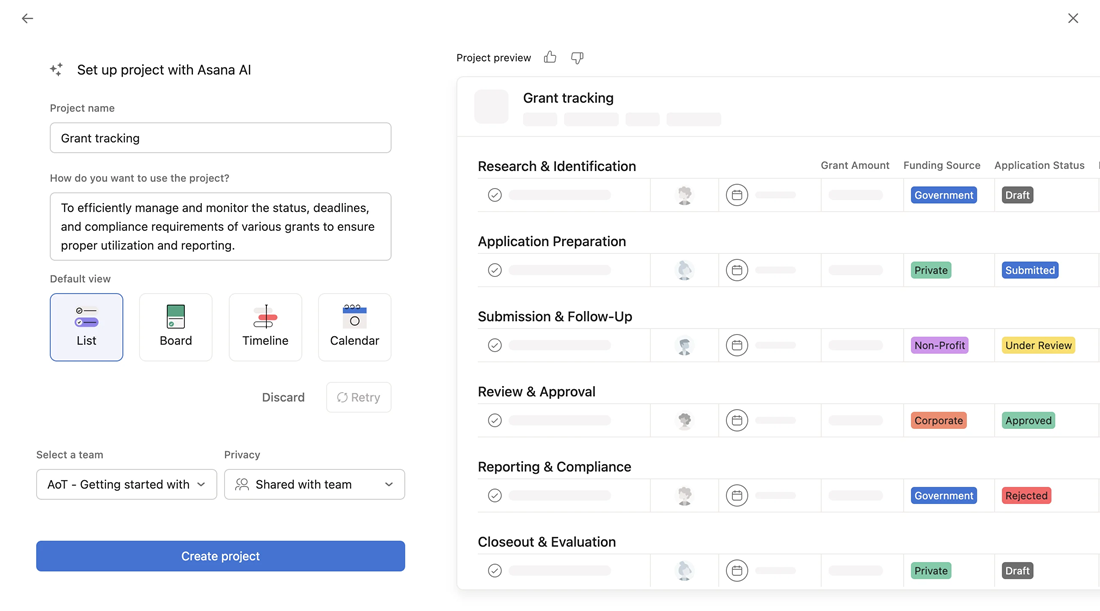
You can also zoom out and see the entire campaign laid out over time, almost like a timeline or roadmap.
Key Features:
- Create a list of tasks, then break each task into smaller steps
- Assign each task to a specific person
- Add due dates so nothing gets missed
- See your work in different ways, including:
• A simple list• A board where tasks move from “to-do” to “in progress” to “done”• A timeline that shows when things are happening over time
- Track major milestones
AI Features:
Asana has one of the more mature AI systems. It can:
- Write status updates for you based on project activity
- Turn a paragraph into a list of tasks
- Summarize long project threads
- Flag risks and suggest next steps
It also has a tool called AI Studio that can automate workflows using plain language.
Templates:
Asana has a large library of templates. You can start with something like an event plan, a fundraising plan, or a general project timeline, then adjust it to match your campaign. This can save a significant amount of setup time.
Pricing:
- Free version available
- Paid plans start around $10.99 per person per month
Nonprofit Discount:
Asana offers discounted pricing for nonprofits »
Pros for Capital Campaigns:
- Gives a clear picture of everything happening across the campaign
- Helps prevent tasks from slipping through the cracks
- Strong for long timelines with many moving parts
Cons:
- Can feel like a lot at first
- Takes time to set up and learn
Best Fit:
Teams that want a highly organized system and are willing to spend a little time learning it.
2. Trello
Trello is the simplest tool on this list. It is part of a group of tools created by a company called Atlassian, which also makes Jira (another top tool, as noted below).
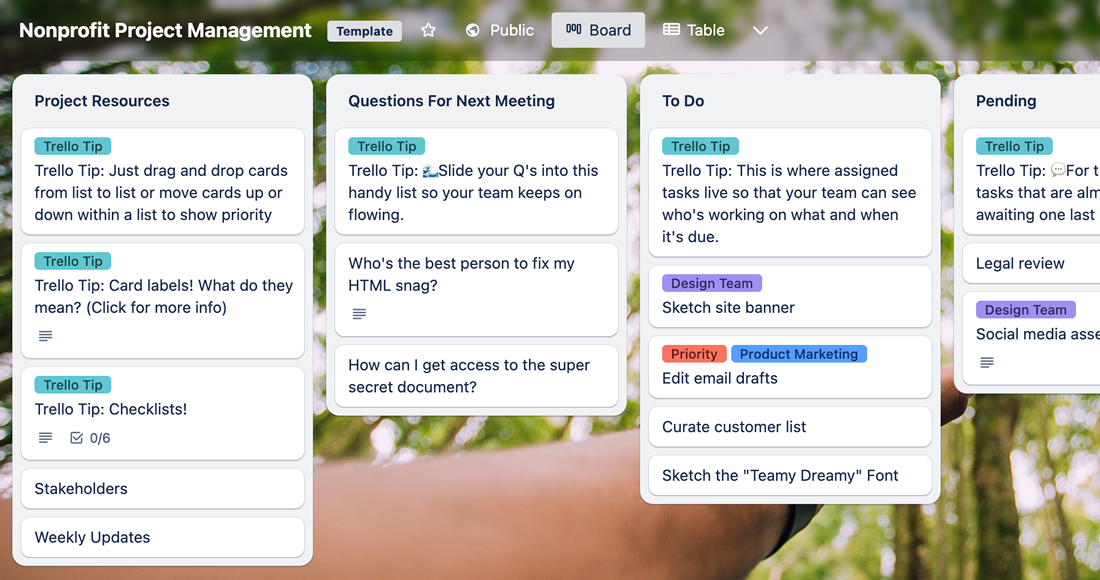
Trello works like a bulletin board. Picture three columns on a wall:
- To-Do
- In Progress
- Done
Each task is written on a card. As work gets done, you move the card from left to right.
Of course, you don’t have to use it as simply as that. You could create columns for different chunks of work, like “Feasibility Study” and have cards (tasks) pertaining to the study only in that column.
Templates:
Trello’s templates are one of the easiest ways to get started, especially if you are not sure how to set things up.
For example, their Nonprofit Project Management template gives you a ready made board with columns that match how real work flows in a campaign. Instead of starting from a blank page, you might see columns like:
- Ideas or Strategy
- Planning
- In Progress
- Waiting or Review
- Completed
Key Features:
- Create cards for each task
- Group cards into columns
- Drag and drop cards as work progresses
- Add checklists and comments
AI Features:
Trello’s AI features are more basic than the others. You may see:
- Help writing descriptions or checklists
- Suggestions for organizing cards
- Simple automation rules
It is helpful, but not a major reason to choose Trello.
Pricing:
- Free version available
- Paid plans start around $5 per person per month
Nonprofit Discount:
Available through Atlassian’s nonprofit program »
Pros for Capital Campaigns:
- Very easy to learn
- Quick to set up
- Clear visual of progress
Cons:
- Limited tracking for more complex campaigns
- Can get crowded with many tasks
Best Fit:
Teams that want something simple and easy to adopt.
3. Monday.com
Monday.com looks and feels like a spreadsheet, but more visual and interactive.
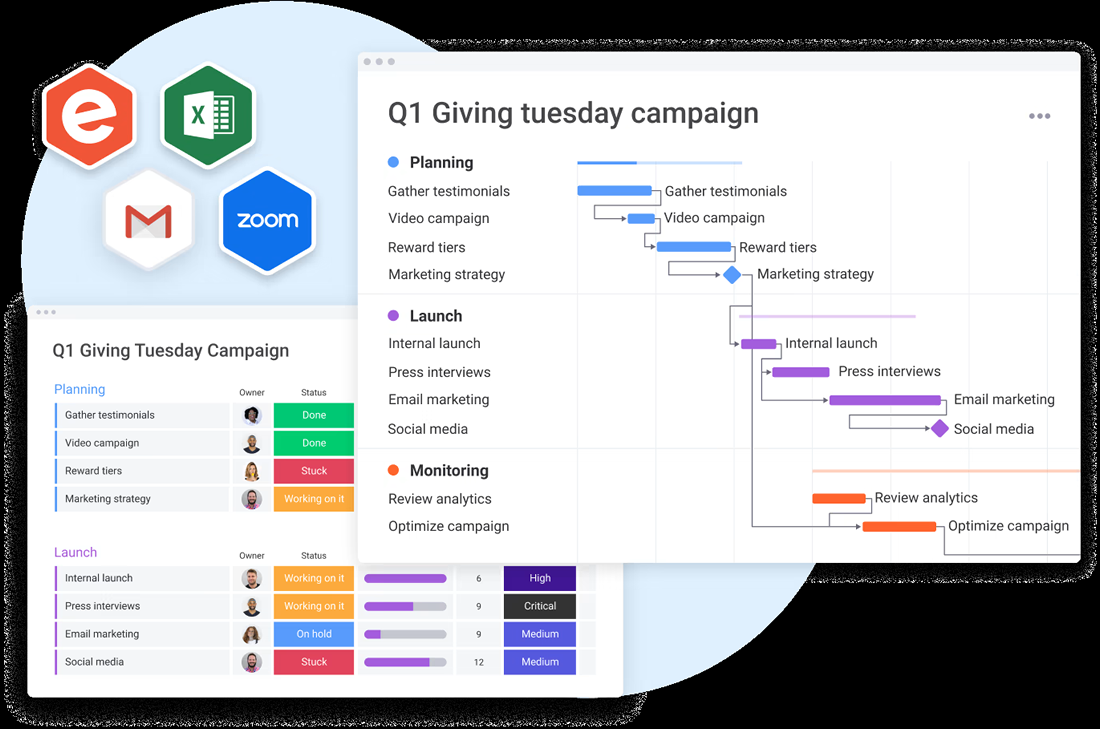
Each row is a task. Each column holds information like owner, deadline, and status. Colors help you quickly see what is on track and what is behind.
Key Features:
- Table style layout for tasks
- Columns for owner, deadline, and status
- Color coded progress tracking
- Calendar and timeline views
- Automated reminders
AI Features:
Monday.com has focused heavily on making AI easy to use. It can:
- Suggest next steps based on your data
- Flag risks like missed deadlines or overloaded team members
- Automatically generate updates
- Help build workflows without technical setup
It is one of the more user-friendly AI experiences in this category.
Templates:
Monday.com includes many ready made templates. You can start with a project plan, event tracker, or fundraising workflow and customize it. Templates are especially helpful here since the platform is flexible and can be shaped in many different ways.
Pricing:
- Paid plans typically start around $8 to $10 per person per month
Nonprofit Discount:
Monday.com offers discounted pricing for nonprofits »
Pros for Capital Campaigns:
- Familiar for teams used to spreadsheets
- Strong visual reporting for leadership
- Flexible setup
Cons:
- Requires some setup
- Costs increase with team size
Best Fit:
Teams that want flexibility and an easier learning curve than more complex tools.
4. Jira
Jira is part of the Atlassian family of tools, the same company behind Trello. While Trello focuses on simplicity, Jira was originally built for software developers and is much more detailed. We’re covering Jira here because if you investigate Trello or Atlassian, you might encounter Jira too.
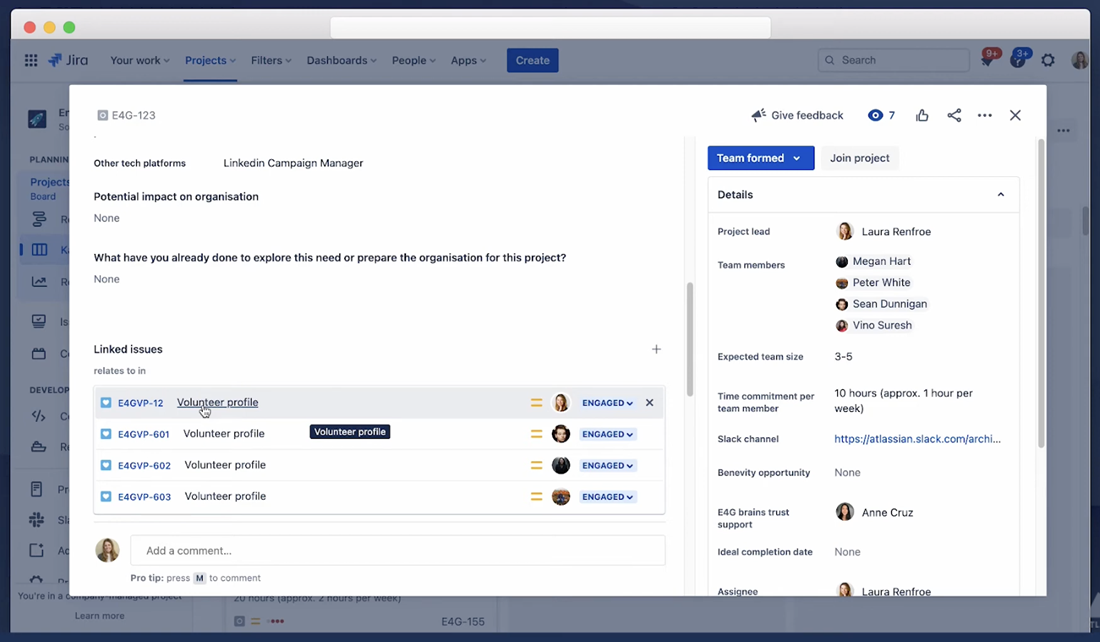
Jira tracks work in a step-by-step way, with clear rules for how tasks move from one stage to another.
Key Features:
- Detailed tracking of tasks through each stage
- Custom workflows with defined steps
- Reporting on progress and workload
- Integration with other Atlassian tools
AI Features:
Jira is one of the more AI forward platforms, especially within the Atlassian ecosystem. It can:
- Let you search and create tasks using plain language
- Summarize issues and project activity
- Answer questions across projects using its AI assistant
- Help break large projects into smaller tasks
It also connects with other Atlassian tools, which gives its AI more context than most competitors.
Templates:
Jira offers templates, though they are more process focused. These templates are often built around workflows, meaning they define how a task moves from one step to the next. They can be helpful, but may require more adjustment for a nonprofit campaign.
Pricing:
- Free version available
- Paid plans start around $7.75 per person per month
Nonprofit Discount:
Available through Atlassian’s nonprofit program »
Pros for Capital Campaigns:
- Very detailed tracking
- Strong reporting
- Powerful if already using Atlassian tools
Cons:
- Harder to learn
- Feels more technical than most fundraising teams need
Best Fit:
Organizations with technical staff or existing Atlassian users.
5. ClickUp
ClickUp tries to bring everything into one place.
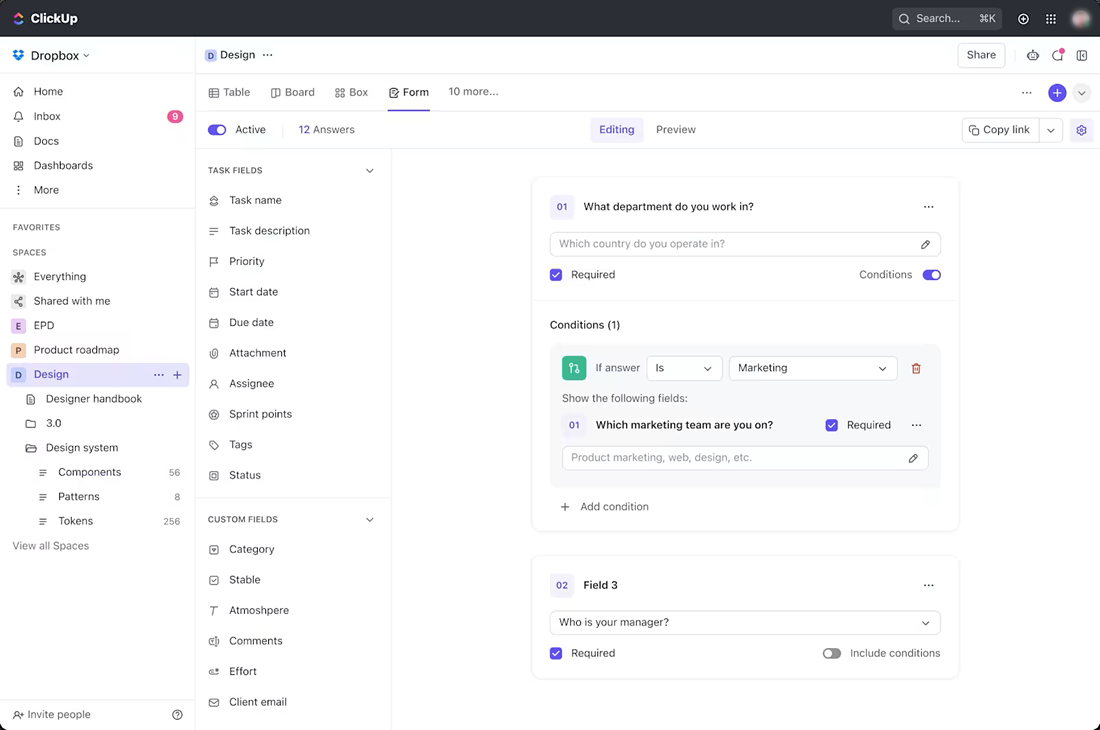
It combines tasks, documents, notes, and communication into a single system so your team is not jumping between tools.
Key Features:
- Task management with assignments and deadlines
- Built in documents for plans and notes
- Multiple views including list, board, and calendar
- Goal tracking
- Team chat
AI Features:
ClickUp has a feature called ClickUp Brain. It can:
- Summarize tasks, documents, and updates
- Write content such as emails or plans
- Turn notes into tasks
- Answer questions about your projects
It focuses on saving time and reducing the need to switch between tools.
Templates:
ClickUp offers a wide range of templates, including project plans, meeting agendas, and goal tracking systems. You can start with a template and then adjust it so it matches your campaign structure.
Pricing:
- Free version available
- Paid plans start around $7 per person per month
Nonprofit Discount:
ClickUp offers discounted pricing for nonprofits »
Pros for Capital Campaigns:
- Keeps tasks and documents in one place
- Flexible for different working styles
- Strong value for the cost
Cons:
- Can feel busy at first
- Takes time to organize properly
Best Fit:
Teams that want an all in one system and are willing to set it up carefully.
How to Choose the Right Tool for Your Nonprofit
A few simple questions can help narrow your options:
- Is there someone in the organization who already knows one tool well?
- Do we already have something in place, and perhaps are already paying for?
- Do you want something very simple or something more detailed?
- Will volunteers or board members need access?
- Does your team prefer a checklist, a board, or a spreadsheet style view?
- How much time can you spend setting this up?
- Does it need to integrate with other systems you might use (like Slack, Zoom or DropBox)?
A simple system that your team actually uses every week will always be more effective than a complicated system that gets ignored.
Project management software helps keep a capital campaign organized and moving forward. It gives your team a shared place to track tasks, deadlines, and responsibilities. The best choice is the one your team feels comfortable using every week. Start with something that fits your current habits, then build from there as your campaign grows.
Check Out the Online Capital Campaign Toolkit
Discover Capital Campaign Pro’s toolkit of templates, samples, and resources — available on any device at any time.




Leave a Comment